 Sketchglass
What is AR drawing, and how does tracing with your phone work?
Your phone camera becomes a see-through tracing sheet. Here is what is going on, how to set it up in five minutes and how to get clean lines.
In this guide
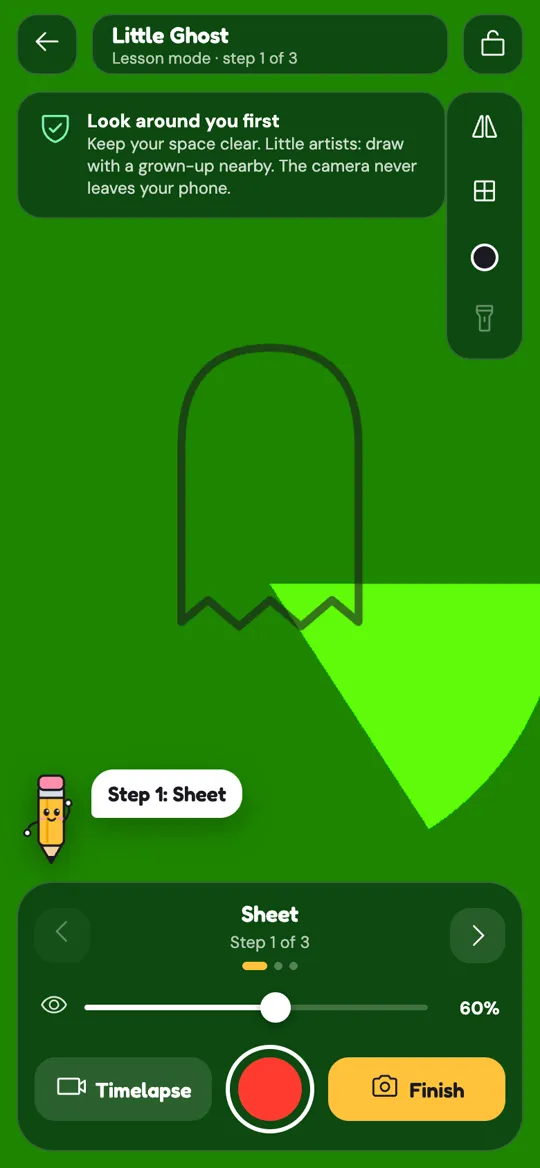
AR drawing (augmented reality drawing) uses your phone camera to show a sketch on top of your real paper. You prop the phone above the paper, place and lock the sketch on screen, then trace its lines with a real pencil while you look through the screen. It works like a tracing sheet you can resize, move and change at any time.
If you have ever held a picture against a bright window to trace it, you already understand the idea. The difference is that the window is now your phone screen, and the picture can be any size, at any angle, on any paper you like.
Phone tracing apps have become a popular way to learn to draw because they take away the scariest part: the blank page. You still hold a real pencil and make every line yourself. The app just shows you where the lines go.
This guide explains what it is, how to set it up, how it compares to older tracing methods, and how to get clean lines from your first try.
How AR drawing works
AR stands for augmented reality, which simply means adding digital things on top of the real world you see through a camera.
In an AR drawing app the camera films your paper live, and the app draws a semi-transparent sketch over that video. When you look at the screen, it looks as if the sketch is printed on your paper. Your hand and pencil appear on screen too, so you can follow the lines as you draw them.
Three things make it work:
- A steady phone. The phone stays still above the paper so the sketch stays in the same place.
- A locked sketch. Once you have placed it, you lock it so a stray touch does not move it.
- Your eyes on the screen. You draw on the paper but watch the screen, which takes a few minutes to get used to.
How to set up AR tracing in five minutes
You need your phone, a sheet of paper, a pencil and something to hold the phone up. Here is the setup we recommend in Sketchglass.
- Clear a space. Use a table with good light and nothing in the way of your elbows.
- Prop your phone. Stand it on a drinking glass or a stack of books, about a hand above your paper, with the camera looking straight down.
- Pick a sketch. It floats over your paper on the screen.
- Place it. Pinch to resize, drag to move and twist to rotate until it sits where you want it on the page.
- Lock it. Tap the lock so the sketch stays put.
- Trace step by step. Follow the lines with your pencil while you look through the screen. Each sketch is split into a few easy steps, so you build it up one part at a time.
- Snap your drawing. When you finish, take a photo of the paper to get your score and your card.

AR drawing vs a light box vs tracing paper
Your phone is not the only way to trace. Here is how it compares to the classic methods.
- Tracing paper is cheap and simple, but you can only trace something that is already printed at the right size, and your final drawing is on thin paper.
- A light box shines light through a printout so you can trace onto normal paper. It gives very clean results, but you need the box, a printer and a flat original.
- AR tracing works on any paper, notebook or sketchbook, at any size. You can switch sketches in seconds. The trade-off is that you look at a screen while you draw, which feels odd at first.
Many artists use all three. AR is the quickest to start with and the easiest to carry around.
Tips for clean lines
Most first attempts look a little wobbly. These habits fix that quickly.
- Draw lightly first. Use soft pencil pressure. You can darken the lines you like at the end.
- Use the tools. Sketchglass has a grid, flip, line colour, opacity and a flashlight. Turn the opacity down if the sketch hides your own lines, change the line colour if it blends into your paper, and use the flashlight in dim rooms.
- Do not chase the screen. If the sketch seems to drift, check that the phone has not moved rather than following the drift with your pencil.
- Big shapes first. Draw the main outline before small details, the same way the step-by-step lessons are ordered.
Want to try a first drawing right now? Our baby T-Rex tutorial is a friendly place to start.
What happens after you trace
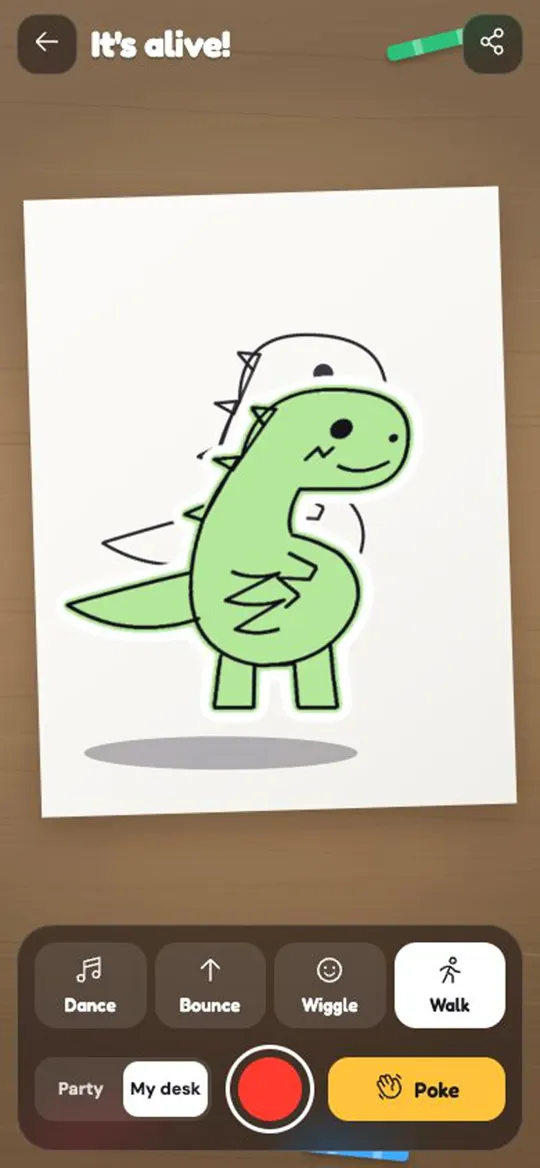
Tracing is only half the fun. When you snap your finished drawing, Sketchglass compares your lines to the sketch and gives you 1 to 3 stars. The drawing becomes a collectible card in your Sketchdex, and you can bring it to life: the app cuts your drawing out of the photo and makes it dance, bounce, wiggle or walk across your desk. You can record a 6-second clip to share.
Is tracing a good way to learn to draw?
Tracing builds the hand skills that drawing needs: steady lines, smooth curves and a feel for how shapes fit together. Many beginners find it gives them the confidence to keep going. The key is to keep moving from tracing towards drawing on your own. Our 7-day drawing practice plan shows one gentle way to do that.
A note on safety and privacy
Because you look at a screen while you draw, take a second to look around before you start, keep your space clear and, for young artists, draw with a grown-up nearby. In Sketchglass the camera frames stay on your phone and are never uploaded, and there is no account to create.
FAQ
Do I need special paper for AR drawing?
No. Any paper works, from printer paper to a sketchbook. Plain, light-coloured paper is easiest because the sketch lines show up clearly on top of it, and you can change the line colour if they blend in.
How high should I hold my phone for AR tracing?
Prop it so the camera looks straight down at the paper from about a hand above it. A drinking glass or a stack of books works well, as long as the phone cannot slide while you draw.
Why does the sketch move while I trace?
Usually the phone has shifted a little, or the sketch was not locked. Make sure the phone sits firmly on its stand, lock the sketch after placing it, and avoid leaning on the table near the phone.
Is tracing with a phone cheating?
No. You draw every line yourself with a real pencil. Tracing is a long-standing way to practise line control, and it works best when you also practise drawing without the guide over time.
Does Sketchglass upload my camera images?
No. The camera view and the photo of your finished drawing are processed on your phone and never uploaded, and you do not need an account.