 Sketchglass
Timelapse drawing projects for kids: 8 ideas worth filming
Watching a blank page fill up in a few seconds feels like magic to children. Here are projects that look great sped up, plus a simple setup that keeps the camera steady and the video short.
In this guide
Good timelapse drawing projects for kids are ones that grow in clear stages: a picture built from simple shapes, a name in bubble letters, a flower that gets coloured petal by petal, or a 7-day "same drawing, better each day" series. Fix the phone above the paper so it cannot move, keep the session between two and ten minutes, and film only the paper and hands. In Sketchglass, the Timelapse button records the camera view while your child traces, and the result sheet lets you save the clip.
A sped-up video turns ten quiet minutes at the table into something they want to watch again, show a grandparent and try to beat next time.
The trick is choosing the right project. Some drawings look exciting sped up and some just look like a blur of hands. This guide gives you eight timelapse drawing projects for kids that build up in clear, satisfying stages, a setup that keeps the video steady, and the exact steps to record one in Sketchglass.
What makes a drawing look good sped up
A timelapse squeezes a long session into a short clip. That works best when the viewer can see the picture change in big, readable jumps.
Look for projects with:
- Clear stages. Outline first, then details, then colour. Each stage changes the page in a way you can see from across the room.
- Bold lines. Thin, light pencil marks almost vanish on a phone screen. Going over the final lines with a darker pencil or a felt-tip makes the last seconds of the video pop.
- Colour that fills big areas. Colouring a sky or a big shape reads beautifully when sped up. Tiny details do not.
- A short session. Two to ten minutes is the sweet spot. Longer sessions still work, but the hand moves so fast that the clip gets hard to follow.
8 timelapse drawing projects for kids
- A cute animal in three stages. Pick something round and friendly, such as a sleepy cat or a happy puppy. The head appears, then the face, then the body. Our sleepy cat guide shows how that kind of drawing splits into stages.
- Their name in bubble or graffiti letters. Outline the letters, add a shadow, then colour each letter a different shade. Names are personal, so kids replay these again and again. The name tracing guide has eight letter styles to choose from.
- A flower that blooms. Draw a tulip or sunflower, then colour it petal by petal. Sped up, it looks like the flower is opening.
- A dinosaur that gets its spikes. A Baby T-Rex or a Stegosaurus starts as a simple body shape and gets more exciting with every plate, tooth and spot.
- A kawaii food picture. An ice cream cone, a cupcake or a cup of boba tea. Lots of small decorations land one after another, like sprinkles or bubbles.
- A Halloween scene. A little ghost first, then a jack-o-lantern beside it, then a dark crayon night sky around them. The sky filling in makes a great ending.
- A card for someone special. Film the front of a birthday or thank-you card, then send the clip with the card. Our guide to drawing birthday cards with kids has design ideas.
- The "one week later" series. Draw the same simple picture once a day for a week and film each one. Put the clips side by side at the end. Children can see their own lines getting steadier.
Set up the phone so the video stays steady
A wobbly camera is the most common reason a timelapse looks messy. The phone needs to sit still above the paper for the whole session.
- Raise the phone. Prop it on a sturdy glass or a stack of books, about a hand above the paper, with the camera looking straight down. Our phone setup guide walks through heights and stands.
- Tape the paper down. Two strips of masking tape stop the sheet from sliding as small hands press and colour.
- Light from the side or above. Daylight from a window works well. Avoid a lamp directly behind the child, because their head will cast a shadow over the page.
- Clear the table. Only the paper, the pencils and the hands should be in view. Cups, letters and screens nearby can end up in the shot.
- Do a test. Record five seconds and play it back before the real drawing. Check that the whole page fits and nothing is cut off.
How to film a drawing timelapse in Sketchglass
Sketchglass is an AR drawing app: it floats a sketch over your real paper through the phone camera so your child can trace it with a pencil. It also has a timelapse recorder built into the tracing screen.
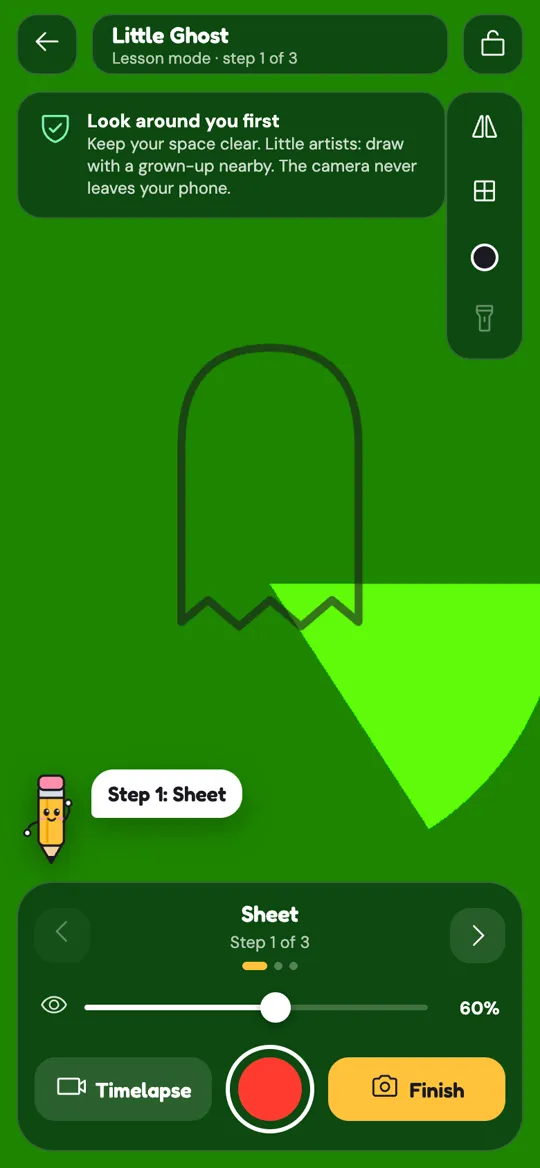
- Pick a sketch, place it and lock it with the padlock in the top corner.
- Tap Timelapse or the round red button next to it. Pip the pencil says "Recording your timelapse!" and a small timer starts counting.
- Draw as usual. Pip guides each step, and the app keeps a picture of the camera view about twice a second.
- Tap Finish when the drawing is done. Finishing stops the recording for you. You can also tap the red button to stop early.
- Tap Save timelapse on the result sheet. It opens your phone's share options, so you can keep the clip or send it to family. Do this before tapping Done, because leaving the tracing screen clears the recording.

A few details worth knowing:
- The clip shows the camera view only: the paper, the pencil and your child's hand. The floating sketch and the buttons are left out, and a small Sketchglass name sits in the corner.
- It plays back at 30 pictures a second, so the first five minutes of drawing turn into about 20 seconds of video. After five minutes, the app takes a picture every two seconds instead, which keeps long sessions short.
- Nothing is uploaded. The camera frames are processed on the phone, and the clip only leaves the phone if you choose to share it.
If your child wants more after the timelapse, Bring it to life turns the finished paper drawing into a little character that dances or walks across the desk. Want to try the other buttons on the tracing screen first? Our tools guide explains each one.
Make it a family or classroom project
Timelapses are easy to turn into a shared activity:
- Film side by side. Two children draw the same sketch at the same time, then watch both clips together. Focus on what each one did differently, not who was faster.
- Start a "growing" folder. Save one clip a week. After a month, play the first and the latest one back to back.
- Make a gallery evening. Each child presents their clip and says one thing they would change next time.
- Pair it with a rainy afternoon. Our list of rainy day drawing activities has more ideas for a long day indoors.
A quick note on privacy for parents
A drawing video is usually just paper and hands, which is what makes it a nice thing to share. Still, take a second before you send it anywhere. Check the clip for faces, school names or anything on the table you would rather keep private. Our parent's guide to AR drawing covers camera privacy in more detail, and the privacy policy explains what the app does and does not keep.
FAQ
What is a good first timelapse drawing project for a child?
A single animal or their own name in bubble letters works well. Both have clear stages, finish in a few minutes and look exciting when sped up.
How long should a timelapse drawing session be?
Two to ten minutes is the sweet spot for kids. In Sketchglass, the first five minutes of drawing become about 20 seconds of video, which is easy to watch and share.
Does the Sketchglass timelapse show the sketch overlay?
No. The video shows only the camera view of the paper, pencil and hand, with a small Sketchglass name in the corner. The floating guide sketch and the buttons are not recorded.
Where does the timelapse go after recording?
Tap Save timelapse on the result sheet, which opens your phone's share options so you can keep or send the clip. Save it before tapping Done, because leaving the tracing screen clears it.
Why does my child's timelapse look shaky?
Usually the phone or the paper moved. Prop the phone on something sturdy, tape the paper down with masking tape and ask your child not to lean on the stand while drawing.